Q: What size should the letters be on my sign? It seems that the last one I had made was a bit difficult to read.
A: The rule of thumb is 1" per 10'. Stick to this rule and you cant go wrong. Keep in mind when creating your composition that 72 point type equals 1"
Q: I downloaded an image from the internet and want to print it. It is a .jpeg image, and it reads 200x300 pixel dimensions when I right click and go to summary in the Properties tab. How big can I print this image?
A: Many people believe that they can take an image from the internet and make a big print from it. Here are a few things you should know prior to getting excited about printing a website image: Image resolution can be defined by how many dots of information per square inch (DPI) exist within in the dimensions of your composition. The count of how many pixels wide by how many high are called pixel dimensions and this information is good to know. If you have an image file that is 2000 wide by 3000 high and multiply those numbers you will have a total of 6 million pixels (or 6 mega pixels). With that many pixels you can print up to about 20" x 30" and maintain good quality. If you want the image bigger you should expect a bit less quality for every inch you add to the size. Most digital cameras on the market today have the ability to shoot at resolutions which are acceptable for good size prints.
If you wish to print an image that you downloaded from the web you should first take a look at the image properties and find out the pixel dimensions. If the image was taken from a website it is likely that the image is very small because viewing images on a monitor requires very little resolution. For the purpose of the following example we will use 200 x 300 pixel dimensions. When multiplying 200 x 300 we have an image with 60 thousand pixels. If you were to properly re-size a 200 x 300 pixel file to a 24" x 36" print, you would end up with a file that contains 8 pixels per square inch and the result will be a mosaic effect. We recommend at least 100-150 DPI for large format printing. But if you print that same images at 1"x1.5" it will be sharp and acceptable to the eye at close range.
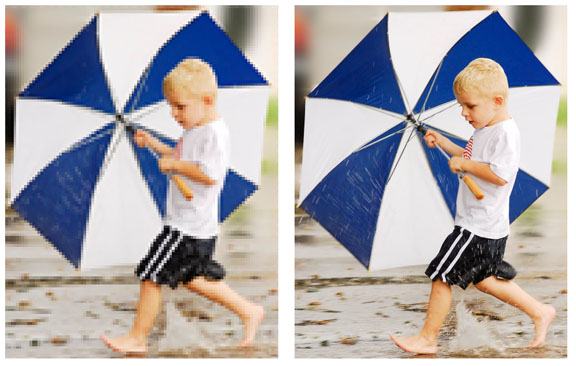
I posted an example above to contrast the difference between an image that was saved once for uploading to the web for family and friends to view at 200 x 300 pixels and again at its original capture of 2000 x 3000. After sizing each image for printing at 4" x 6", you can clearly see the pixelation from the one on the left. It was originally meant for viewing on the web and not for printing. If your image is meant to be seen from a distance then the pixelation will not be as noticeable. An example of this would be for you to step back a few feet from your monitor and view these 2 photos.You will notice that they will begin to look identical.
Q: What is the Pantone Matching System?
A: The Pantone Matching System, also known as the PMS color system, is a popular color matching system used by the printing industry to print specific colors. PMS match books are books of color where each PMS color has its own name or number that can help make sure your colors are the same each time you print, even if your monitor displays a different color or if you change printing services.
Q: What resolution is recommended for printing?
A: For large format printing, we recommend that your images be at least 150 DPI at their final size. For offset printing such as brochures, a resolution of 266 - 300 DPI is recommended.
Q: What are the common sizes for Catalogs & Booklets?
A:Most commercial printers will offer your catalog or booklets in these standard sizes 5-1/2" x 8-1/2", 8-1/2" x 11", or 11" x 17". One of the reasons for this is to keep the finished product at a standard size for storage, and another reason is for use of standard size stock cuts. You may order any size.
Q: What are the grades of paper and the basis weight of each?
A:The standard weight of a paper is defined by the weight of 500 standard-sized sheets in pounds. Here are the different grades of paper and their respective basis weights:
Bond: Plain, uncoated stock that we use for architectural plans or jobs with very little ink coverage. Ranges in weight from 24# - 38#.
Text: A high-quality sheet suitable for most offset printing applications ranges in weight from 60# to 100#, but the most common weight is 80#.
Uncoated Stock: Usually reserved for letterheads, business forms, and quick printing jobs.
16# for forms, 20# for copying, and 24# for stationary.
Coated Stock: A glossy sheet that yields vivid colors and excellent reproduction.
Generally goes from 30# to 70# for web, 60# to 110# for sheet fed.
Cover: Used for book covers, postcards, and business cards. Coated or uncoated.
Come in 60#, 65#, 80# or 100# weights.
Q: What type of material can I print my sign or banner on?
A:There are several substrates (materials) the printer can use for your sign or banner. Here are a few of the most popular by category: